Best Payment Apps for Craft Fair Vendors in 2026
If you're still running a cash-only booth at craft fairs, you're leaving money on the table — literally. The majority of shoppers expect to pay by card or phone tap, and vendors who accept card payments consistently outsell those who don't. Some estimates put the difference at 20–30% higher sales.
The good news: getting set up to take card payments is easier and cheaper than it's ever been. Here are the best options for craft vendors in 2026, with honest pros and cons for each.
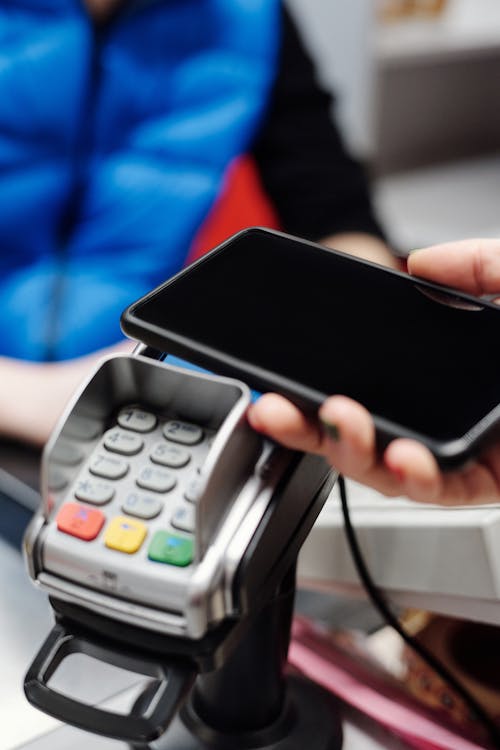 Photo from Pexels
What to Look For
Before comparing specific apps, here's what matters most for a craft fair vendor:
- Transaction fees — the percentage taken per sale (usually 2.5–2.9% + a small fixed fee).
- Hardware cost — some readers are free, others cost $30–$60.
- Offline mode — can you still take payments if the cell signal drops? This is critical at rural fairgrounds.
- Payout speed — how quickly does money hit your bank account?
- Ease of use — you'll be handling the reader while talking to customers, making change, and managing a crowd. Simplicity matters.
Square
Best for: Most craft vendors, especially first-timers.
Square is the default for a reason. It's simple, reliable, and almost everyone has heard of it.
- Transaction fee: 2.6% + $0.10 per tap/chip/swipe
- Card reader: First magstripe reader is free. The Square Reader for contactless and chip is $59.
- Offline mode: Yes — processes payments offline and syncs when you're back online.
- Payout speed: Next business day (or instant for a 1.75% fee).
- Extras: Built-in inventory tracking, receipt emails, sales reporting, and a free online store you can link to.
Pros: Dead simple to set up. Rock-solid reliability. Huge user community, so help is easy to find. Cons: Fees are slightly higher than some competitors. Account holds can happen to new users with sudden spikes in sales volume.
PayPal Zettle (formerly PayPal Here)
Best for: Vendors who already use PayPal for online sales.
If your online shop runs through PayPal, Zettle keeps everything in one ecosystem. The reader is compact and handles tap, chip, and swipe.
- Transaction fee: 2.29% + $0.09 per transaction
- Card reader: $79 for the Zettle card reader (occasionally discounted for new users).
- Offline mode: Limited — requires an internet connection for most transactions.
- Payout speed: 1–2 business days to your PayPal balance; instant transfer to bank for a fee.
- Extras: Integrates directly with PayPal and Venmo balances.
Pros: Lower transaction fees than Square. Good if you already live in the PayPal world. Cons: Reader is more expensive upfront. Offline mode is weak, which is a real problem at outdoor fairs.
Stripe Terminal (Stripe Reader M2)
Best for: Vendors who sell online through Stripe and want unified reporting.
Stripe is the dominant online payment processor. Their physical card reader, the M2, connects your in-person fair sales with your online sales in a single dashboard.
- Transaction fee: 2.7% + $0.05 per in-person transaction
- Card reader: $59 for the Stripe Reader M2.
- Offline mode: Yes — collects payment details offline and processes when reconnected.
- Payout speed: 2 business days standard.
- Extras: Unified analytics across online and in-person sales. Developer-friendly if you have a custom website.
Pros: Great if you already use Stripe online. Clean hardware, long battery life. Strong offline mode. Cons: Slightly more technical to set up than Square. Less plug-and-play for non-technical users.
SumUp
Best for: Budget-conscious vendors who want low hardware costs.
SumUp keeps things minimal — a compact reader, straightforward fees, and no monthly charges.
- Transaction fee: 2.75% per transaction (no fixed per-transaction fee)
- Card reader: $39 for the SumUp Plus (includes PIN pad for debit). $49 with charging dock.
- Offline mode: No — requires a Bluetooth connection to your phone and internet access.
- Payout speed: 1–2 business days.
- Extras: Simple invoicing and a basic online store option.
Pros: Cheapest hardware. No monthly fees. Very simple to use. Cons: No offline mode. Slightly higher percentage fee with no flat per-transaction component (which means it costs relatively more on small transactions). Fewer features than Square.
Shopify POS
Best for: Vendors who already have a Shopify online store.
If you sell online through Shopify, their POS system syncs your in-person and online inventory automatically. When you sell a candle at the fair, your online store updates in real time.
- Transaction fee: 2.6% + $0.10 per in-person transaction (on the Basic Shopify plan)
- Card reader: Shopify Tap & Chip reader is $49.
- Offline mode: Yes — can take cash sales offline and processes card transactions when reconnected.
- Payout speed: 2–5 business days depending on your plan.
- Extras: Automatic inventory sync between online and in-person channels. Customer profiles, discount codes, and gift cards.
Pros: Seamless if you're already on Shopify. Inventory sync is a real game-changer for vendors selling on multiple channels. Cons: Requires a Shopify subscription ($39+/month). Overkill if you don't sell online through Shopify.
Quick Comparison Table
| Feature | Square | PayPal Zettle | Stripe M2 | SumUp | Shopify POS |
|---|---|---|---|---|---|
| Fee per transaction | 2.6% + $0.10 | 2.29% + $0.09 | 2.7% + $0.05 | 2.75% | 2.6% + $0.10 |
| Reader cost | $59 | $79 | $59 | $39 | $49 |
| Offline mode | Yes | Limited | Yes | No | Partial |
| Monthly fee | None | None | None | None | $39+ |
| Best for | Most vendors | PayPal users | Stripe users | Budget | Shopify users |
Which One Should You Pick?
For most craft vendors — especially those just getting started — Square is the safest choice. It's easy to set up, works offline (critical at fairgrounds), has no monthly fees, and the reader is affordable. You can be up and running in 15 minutes.
If you already sell online through a specific platform (PayPal, Stripe, Shopify), use the matching POS to keep your sales and inventory in one place.
And regardless of which app you choose: always bring cash backup. Keep $100–$200 in mixed bills in a cash box. Technology fails, cell signals drop, and batteries die. Cash never crashes.
Featured High-Volume Fairs for Payment Testing
If you're setting up a payment system, these popular, high-traffic fairs are perfect testing grounds:
Common Ground Country Fair 2026 — Maine's largest fair; high daily foot traffic ideal for payment processing testing
Paradise City Arts Festival - Spring 2026 — Northampton MA with strong buyer base and consistent high volume
League of NH Craftsmen's 93rd Annual Fair — 9-day regional event with sustained daily traffic
More Vendor Tips
This post is part of our vendor guide series for craft fair sellers in New England. Before you set up payment processing, read about the other essential setup steps:
- So You Want to Be a Craft Fair Vendor — the complete beginner's guide
- Booth Display Ideas That Actually Increase Sales — how to set up a booth that stops people
- How Many Items Should You Bring? — a simple inventory formula
- Do You Need Vendor Insurance? — what it covers and where to get it
- How to Build an Email List at Craft Fairs — turn fair shoppers into repeat customers
State-Level Craft Fair Guides
Ready to find craft fairs in your state? These guides break down the best events and tips for each region:
- Craft Fairs in Maine 2026: A Vendor's and Visitor's Guide — Maine's top events and vendor tips
- Craft Fairs in New Hampshire 2026: A Vendor's and Visitor's Guide — New Hampshire's premier craft fair circuit
- Craft Fairs in Vermont 2026: A Vendor's and Visitor's Guide — Vermont's artisan markets and fairs
- Craft Fairs in Massachusetts 2026: A Vendor's and Visitor's Guide — Massachusetts craft fairs and events
State-Level Fair & Festival Guides
For vendors and visitors in Connecticut and Rhode Island:
- Connecticut Fairs and Festivals 2026: Your Complete Guide — Connecticut's best fairs, boat shows, and craft events
- Rhode Island Fairs and Festivals 2026: Your Complete Guide — Rhode Island's festivals, WaterFire, and Newport events
Stand Out at Maine Fairs
If you're a Maine maker, consider joining the Maine Made program. Maine Made – America's Best is a 30-year-old certification program that provides free branding materials, event listings, and networking opportunities designed specifically for craft fair vendors. Read our complete guide to Maine Made for craft fair vendors to learn how certification can help you stand out at events across the state.
Last updated: April 2026